
What is a hotel pickup report? How to read one
A pickup report shows how many room nights and how much room revenue you've gained or lost for each future night since you last looked. It compares two snapshots of what's on the books, so it measures movement rather than position. Read it by stay date first, then by segment and channel, and you'll know whether those seven rooms are worth celebrating.

It's 8am, and the pickup report says a Saturday five weeks out picked up seven rooms this week. Is that good news?
What is it?
A pickup report shows how many room nights and how much room revenue you've gained or lost for each future night since you last looked. It compares two snapshots of what's on the books, so it measures movement rather than position. Read it by stay date first, then by segment and channel, and you'll know whether those seven rooms are worth celebrating.
What's on it
Most pickup reports show, for each stay date:
- Rooms on the books now, and at the earlier snapshot
- Room revenue on the books, and the average rate
- Pickup, which is the change between the two, in rooms and in revenue
- Often, new bookings and cancellations in separate columns, a split by segment (transient, corporate, groups, wholesale) and by channel (direct, OTA, GDS), and the rooms left to sell
Opera, Guestline, HotSoft and most other PMSs produce a version. Plenty of teams still export it and rebuild it in Excel every morning.
Net, gross and cancellations
Net pickup is the number to read first: what came on, less what came off.
Gross pickup counts new bookings only, so it flatters a date that's quietly losing rooms. That's why it pays to see new bookings and cancellations side by side. Plus seven made of seven new bookings is a very different date from plus seven made of ten new and three cancelled.
When pickup goes negative, more came off the books than went on. The usual reasons are a group releasing rooms from its block, or one large cancellation.
Which window to read
An overnight window is fine for dates inside a week and noisy further out. Seven days is the steadiest view for most decisions. "Since a given date", like since last Monday or since the rate change, is usually what a GM actually wants to know, and it's often the one the PMS report won't give you.
Whichever you use, take the snapshot at the same time every day, after night audit. If the snapshots aren't comparable, neither is the pickup.
How to read a pickup report
- Net, then the parts. Seven up, made of ten new bookings and three cancellations. Three cancellations on one date in a week is worth a glance.
- The rate. Rooms went up and the average rate came down, so something cheaper is doing the selling.
- The split. Most of the new rooms came through OTAs on a promotional rate. The cancellations were flexible OTA bookings.
- The call. There's demand for that Saturday, and a promotion is filling it. The question for the morning meeting is whether the promotion still needs to be open. Whether the date is ahead of last year or of budget is a pace question, and that's a different report.
The report shows what moved. Deciding what to do is the job.
Why the split by segment matters
A total can hide movements that cancel each other out. A group block can cover a soft week of transient, and a lost corporate account shows up as missing weekdays long before anyone notices the account has gone quiet. Read transient with groups taken out, and read each channel's rate as well as its rooms. If pickup is behind, the split is usually where the reason is.
Getting it without rebuilding it every morning
At The Johnstown Collection, the daily pickup used to start with a CSV export from Opera, pasted over the previous day's tab in Excel. That took roughly 40 to 45 minutes per property, every morning. The group now estimates it saves 1.5 hours a day on pickup reporting across both hotels. Read the Johnstown story.
Otel is the AI layer that reads every system your hotel already runs as one hotel, and hands each team its decisions with the case already made. It reads the PMS you already have, even if it has no API, and your pickup report arrives at a set time, split by segment, with the commentary written. Ask any number on it where it came from.
Book a demo → · See the revenue view ↗
Common questions
What's the difference between pickup and pace? Pickup is what changed since you last looked. Pace is where you stand against the same point last year, or against budget. You need both before you change a rate.
What is net pickup? New bookings minus cancellations, for the same stay dates over the same window. It's the real change in what's on the books.
What pickup window should I use? Seven days for most decisions, overnight for dates inside a week, and "since a given date" to see what's happened since a rate change or a promotion went live.
How often should a hotel run a pickup report? Daily for the next 90 days or so, at the same time each morning, with a weekly look further out. Consistent timing matters more than frequency.
Once the 2027 budget is signed, pickup against budget is how you'll know, week by week, whether it's coming true. For the bigger picture, see our posts on forecast, RMS and budget and the 2027 budget checklist.
Continue reading
Related articles
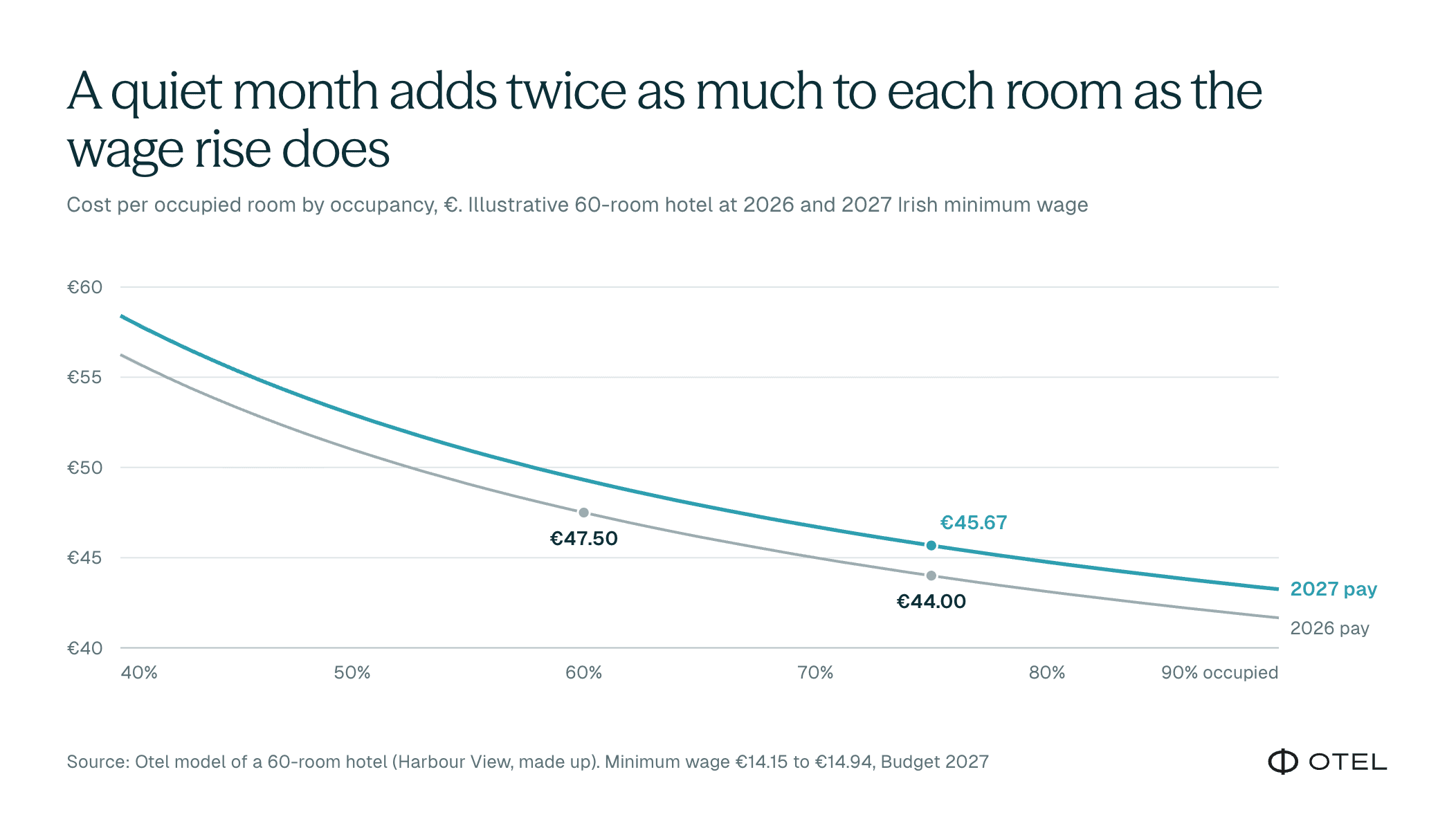
Cost per occupied room (CPOR): what it is, and why it rises in quiet months
Cost per occupied room is what it costs your hotel to sell one room for one night. Add up what the rooms department cost for a period and divide it by the occupied room nights. It tells you whether each night you sell is getting cheaper or dearer to deliver, which total spend on its own won't show you.
 Tadhg McNealy·10 Nov 2026

Your 2027 hotel budget: what it might be missing
A second look at your 2027 hotel budget: seven lines that slip through, and how to add AI mid-year with a clear, provable return on investment.
Tadhg McNealy·4 Nov 2026
Budget 2027: protect the service, not the spreadsheet
Ireland's minimum wage rises to €14.94 in 2027, but the real payroll cost is higher. How hotels can absorb it through efficiency, not cutting service
Tadhg McNealy·4 Nov 2026